How to Choose the Right Medication Type in PeptideCalc
Direct answer
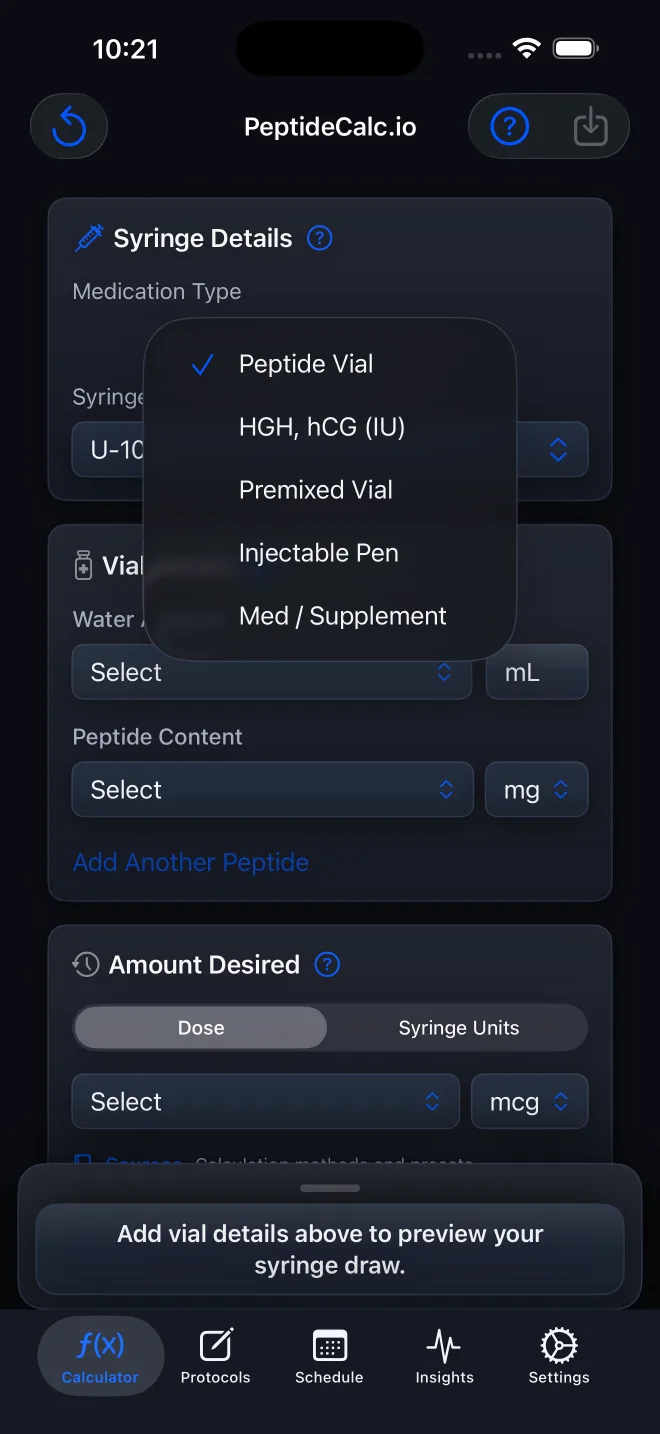
Open Calculator, tap Medication Type, and match the option to the product's actual container and label. Use Peptide Vial for a vial described by total content plus added water, HGH, hCG (IU) for that same vial workflow when both content and target are in IU, Premixed Vial for a liquid vial with a known concentration, Injectable Pen for a prefilled pen or injector, and Medication / Supplement for a solid or liquid non-injectable. PeptideCalc changes its fields to fit the selected workflow; it does not decide what treatment applies to you.
Medication Type is the first choice on the Calculator because the five options represent different package forms and input models. The right match keeps you from entering a premixed concentration as though it were dry-vial content, or treating a pen as though it were a syringe-filled vial.
Start with the container and the way the label expresses strength, not the medication name by itself. Use the product label and instructions from your clinician or pharmacist as your source. PeptideCalc calculates from those inputs; it does not select a medication, device, dose, or route.
Scope: This page explains PeptideCalc controls and software workflows. It does not choose a medication, dose, liquid, syringe mark, preparation method, or administration technique. Use the product label and instructions from a licensed clinician or pharmacist to decide whether any input or result is appropriate. Changing Medication Type changes the calculator fields and units; it does not change or create clinical instructions.
These labels and steps were checked in the public PeptideCalc 2.7.7 app on .
See the steps in PeptideCalc
Step-by-step instructions
Step 1: Open Calculator
Open PeptideCalc and select Calculator in the tab bar.
Step 2: Open Medication Type
At the top of the Calculator, tap the current option under Medication Type to open the menu.
Step 3: Check the container and label first
Identify whether you have a vial that needs a water-and-content calculation, a premixed liquid vial, a prefilled pen or injector, or a solid or liquid non-injectable. Then check whether the supplied amount is expressed in a mass unit such as mg or mcg, in IU, or as a concentration.
Step 4: Use Peptide Vial for content-and-water vial math
Choose Peptide Vial when the inputs you have are total vial content in a mass unit, a Water Amount in mL, a target amount, and a matching syringe. This workflow displays Vial Details and the syringe ruler. It does not tell you what liquid or amount to add.
Step 5: Use HGH, hCG (IU) for an IU-labeled vial workflow
Choose HGH, hCG (IU) when the product is being calculated as a vial with Water Amount and total Peptide Content, and both the vial content and supplied target are expressed in IU. Do not select this option solely because the label contains IU: a prefilled pen still belongs in Injectable Pen.
Step 6: Use Premixed Vial for a known liquid concentration
Choose Premixed Vial when the product is already liquid and its concentration and total vial volume are known. This workflow asks for Vial Concentration and Total Vial Volume instead of Water Amount and dry-vial content.
Step 7: Use Injectable Pen for a prefilled pen or injector
Choose Injectable Pen when the actual device is a prefilled pen or compatible injector. The Calculator shows medication or custom-name controls, packaged-strength and per-injection dose fields, and optional pen supply tracking. It does not show the vial dilution workflow.
Step 8: Use Medication / Supplement for a solid or liquid non-injectable
Choose Medication / Supplement for count-based solids or measured liquids that you want to save, schedule, or track. Select Solid for count-based entries or Liquid for a labeled liquid concentration; optional supply fields track item count or total volume.
Step 9: Confirm that the new fields match your source
Before entering values, check that the headings, units, and package fields now match the information you actually have. If the Calculator is asking for water when your product is already liquid, or asking for vial content when you have a pen, reopen Medication Type.
Step 10: Enter your supplied values
Enter only the label information and independently determined or prescribed inputs that apply to you. PeptideCalc will calculate and display results from those values.
Questions about this PeptideCalc workflow
Which Medication Type should I use for a vial labeled in IU?
Use HGH, hCG (IU) when it is a vial workflow and both the total content and supplied target are in IU. If the product is actually a prefilled pen or another package form, match that form instead of choosing by the unit alone.
Why did the Calculator fields change?
Each Medication Type uses a different input model. Peptide Vial asks for vial contents and water, while Premixed Vial asks for a labeled concentration and total vial volume.
What is the difference between Peptide Vial and Premixed Vial?
Peptide Vial uses total vial content plus Water Amount. Premixed Vial uses the known concentration and total volume of a product that is already liquid.
Should I choose HGH, hCG (IU) for every product that mentions IU?
No. IU is only one part of the match. Also check the container and the fields supplied by the label. A prefilled pen should use Injectable Pen, and insulin or vitamin D units should not automatically be entered in the HGH, hCG (IU) vial workflow.
Can Medication / Supplement track liquids as well as pills?
Yes. Choose Solid for count-based medication or supplement entries, or Liquid to enter a labeled concentration and let PeptideCalc calculate the corresponding volume from the dose you supply.
Does PeptideCalc decide which Medication Type I should use?
No. Match the option to the label, unit, and device information you already have. Ask a clinician or pharmacist if those source instructions are unclear.
Follow the steps in PeptideCalc
Check Apple's listing for the current price, compatibility, and availability.

Related PeptideCalc resources
Browse all PeptideCalc tutorials.