User-defined schedules and reminders
Peptide Schedule Tracker for iPhone and iPad
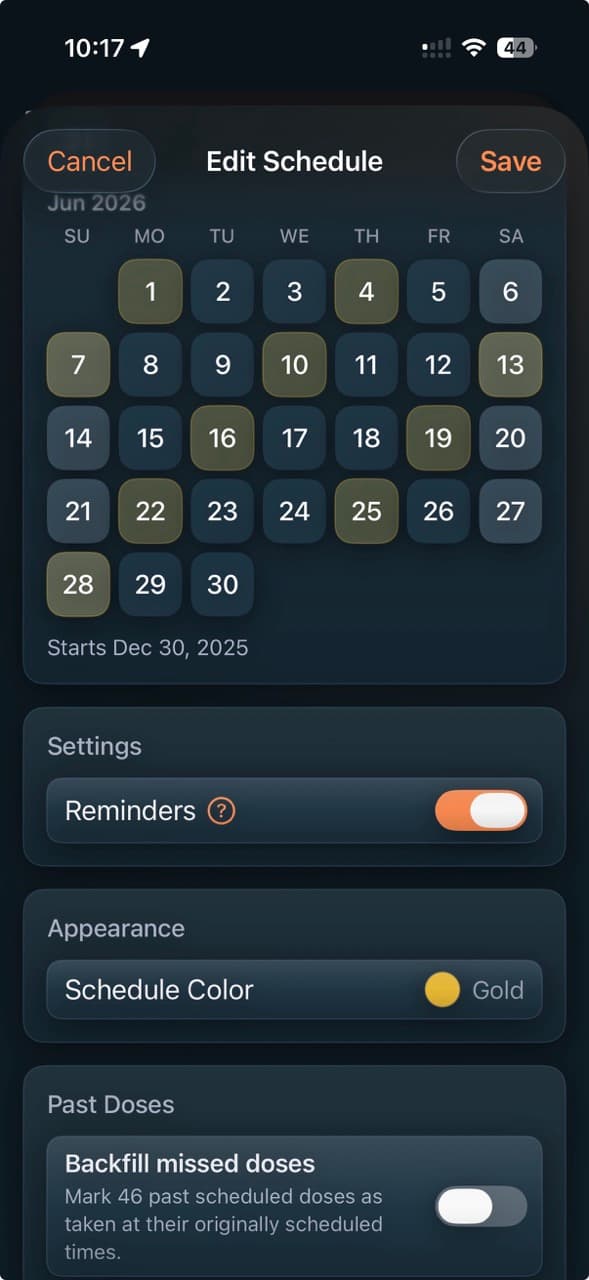
PeptideCalc turns the schedule settings in your draft into a calendar you can preview, save, and track, with reminders, titration tools, and cycling periods when you use them.
Calendar and active views help you review upcoming and prior entries, while optional notifications use the reminder times you configure. Review every value before saving; the app does not determine whether a dose or schedule is clinically appropriate.

$4.99 once · iPhone and iPad · iOS 18.6 or later
Product facts
- Platform
- iPhone and iPad running iOS or iPadOS 18.6 or later.
- Price
- $4.99 as a one-time App Store purchase.
- Account
- No PeptideCalc account is required.
- Sync
- Optional iCloud sync is available for supported app data across signed-in Apple devices.
PeptideCalc uses app analytics and crash or diagnostic reporting as described in its Privacy Policy.
What it does
Schedule tools driven by the details you enter
User-defined cadence
Enter your own repeating cadence, custom interval, dose times, start date, and related schedule settings.
Calendar preview
Preview the dates generated from your inputs before saving the schedule to the calendar.
Titration tools
Review or edit the start value, target value, step size, and timing, then preview the resulting progression before saving.
Cycling tools
Define your own on and off periods and review how those user-entered periods affect the schedule.
Reminders and dose status
Optionally enable notifications for the times you set and record doses as completed, skipped, missed, or pending.
Active and history views
Review upcoming entries, active routines, adherence summaries, pending doses, and prior logs created from your schedule.
How user-defined schedule tracking works
- 1
Enter the routine you already have
Supply the cadence, dates, times, and dose details, and review any editable value the app prefills for convenience.
- 2
Preview the generated dates
Review the calendar and, when used, the titration steps or cycling periods produced from your entries.
- 3
Save, remind, and log
Save the schedule, optionally enable reminders, and update each due entry as you maintain your own records.
Scope and limitations
What the app does not decide
- When the titration start field is empty or still matches the target, the app may prefill a starting value equal to 25% of the target as an editable convenience. Review every value; the app does not determine clinical appropriateness.
- A calendar or titration preview shows the result of your inputs; it is not a statement that the schedule is medically appropriate.
- Notifications are optional reminders for times you entered and may depend on iOS notification settings.
- iCloud sync is optional and applies only to supported app data. App analytics and crash or diagnostic reporting are described in the Privacy Policy.
Frequently asked questions
Can I create a custom peptide schedule in PeptideCalc?
Yes. You can enter your own cadence, custom intervals, dose times, start date, reminders, and related settings, then preview the generated dates before saving.
Does PeptideCalc support user-defined titration tracking?
Yes. You can review or edit the start value, target value, step size, and timing, then preview the progression before saving. When the start is empty or still matches the target, the app may prefill a starting value equal to 25% of the target as an editable convenience.
Can PeptideCalc track cycling schedules?
Yes. The app can track on and off periods that you define. It does not suggest a cycle or decide how long either period should be.
Does the peptide schedule tracker send reminders?
PeptideCalc can send optional iOS notifications for the schedule and reminder times you enter, subject to your device notification settings.
Does PeptideCalc recommend a peptide schedule or dose?
PeptideCalc does not determine whether a medication, dose, cadence, titration step, or cycling period is clinically appropriate. When the titration start field is empty or still matches the target, it may prefill 25% of the target as an editable convenience; review or replace that value.
Related PeptideCalc pages
Peptide tracker app
See the complete protocol, dose log, injection-site, inventory, and schedule workflow.
Injection site tracker
Record user-selected sites with dose logs and review last-used hints and history.
Complete iOS app overview
Review the calculator, protocol, Insights, Apple Health, iCloud, and import features.
Keep your own records together on iPhone or iPad
PeptideCalc is available for a $4.99 one-time purchase and does not require a PeptideCalc account.