How to Use the HGH and hCG IU Calculator in PeptideCalc
Direct answer
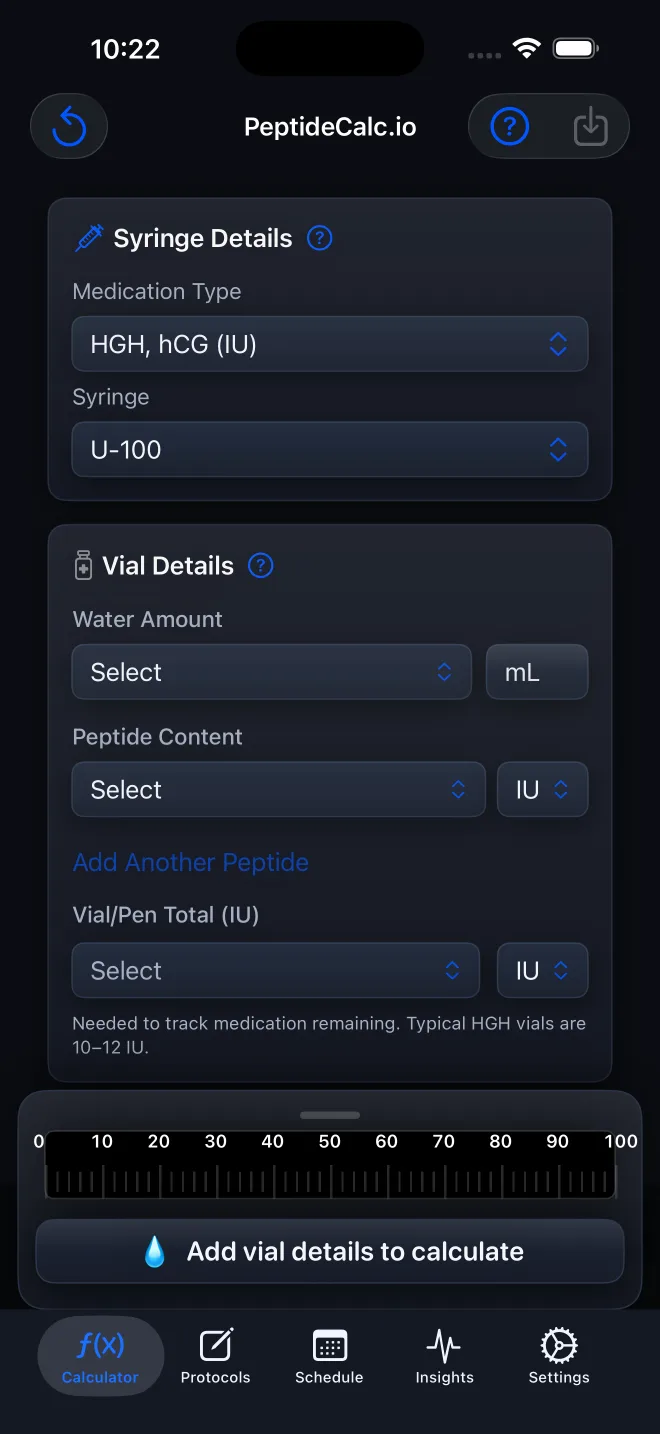
For a vial whose total content and supplied target are both labeled in IU, open Calculator, choose HGH, hCG (IU), select the matching syringe, and enter Water Amount, Peptide Content, and Target Dose from your source information. PeptideCalc calculates the syringe result. The workflow is based on label units and package form, not on a medication name alone.
The HGH, hCG (IU) Medication Type is the app's IU-labeled vial workflow. It keeps total vial content and Target Dose in IU so you do not have to force an IU label into a mass-unit field.
Packaging still matters. hCG vials and some lyophilized gonadotropin vials are examples of products whose labels may express activity in IU. Some products with IU on the label instead come as prefilled pens and belong in Injectable Pen. These are packaging examples, not dose or treatment recommendations.
Use the product label and instructions from your clinician or pharmacist for every value. The app does not determine potency, a preparation method, or a target dose.
Scope: This page explains PeptideCalc controls and software workflows. It does not choose a medication, dose, liquid, syringe mark, preparation method, or administration technique. Use the product label and instructions from a licensed clinician or pharmacist to decide whether any input or result is appropriate. IU values must come from the vial label and your instructions; PeptideCalc does not determine potency, preparation, or a target dose.
These labels and steps were checked in the public PeptideCalc 2.7.7 app on .
See the steps in PeptideCalc
Step-by-step instructions
Step 1: Open Calculator
Open PeptideCalc and select Calculator in the tab bar.
Step 2: Choose HGH, hCG (IU)
Under Medication Type, choose HGH, hCG (IU). The vial-content and target-dose controls switch to IU. Use this only when the actual package and instructions fit the vial-and-water workflow.
Step 3: Confirm that it is a vial workflow
Check that your source information provides total vial content in IU and a Water Amount. If the product is a prefilled pen, choose Injectable Pen instead. If it is already liquid with a known concentration, review whether Premixed Vial matches the label better. Some GONAL-F presentations, for example, are supplied as vial kits while others are prefilled pens, so the product name or IU label alone does not decide the workflow.
Step 4: Select the matching syringe
Under Syringe, choose the syringe type and capacity that match the one you use. Do not select a syringe based on the app alone.
Step 5: Enter the vial details
Under Vial Details, enter the Water Amount in mL and the total Peptide Content printed on the vial in IU.
Step 6: Enter the supplied Target Dose
Under Amount Desired, enter the independently determined or prescribed Target Dose in IU. PeptideCalc does not choose this value.
Step 7: Review the calculated result
Check the calculated syringe result against the syringe you selected and the source values you entered. Correct any mismatched unit or label value before saving.
Step 8: Treat product examples as label examples only
An hCG vial or a lyophilized gonadotropin vial such as MENOPUR may show activity in IU on its label. The current U.S. MENOPUR label, for example, describes 75 IU FSH activity and 75 IU LH activity per vial. That illustrates how an IU label can look; it does not supply a dose for PeptideCalc or tell you whether to use the product.
Questions about this PeptideCalc workflow
Why does Peptide Content show a mass unit instead of IU?
Reopen Medication Type and choose HGH, hCG (IU). Peptide Vial uses mass-unit inputs, while the HGH, hCG (IU) option uses IU.
Does PeptideCalc choose my IU Target Dose?
No. The app calculates from the Target Dose you enter. Use only a dose independently determined for you or supplied by a licensed clinician.
Can PeptideCalc choose a syringe for me?
No. Select the option that matches the syringe you actually use so the displayed marks correspond to that syringe.
What products can be labeled in IU?
hCG vials and some lyophilized gonadotropin vials are examples. The U.S. MENOPUR label expresses FSH and LH activity in IU. These examples only show label formats; they are not dosing guidance, and the correct PeptideCalc workflow still depends on the actual container and supplied instructions.
Should a prefilled IU pen use HGH, hCG (IU)?
No. Choose Injectable Pen when the actual product is a prefilled pen, even if its label expresses strength in IU. The HGH, hCG (IU) option is the vial-and-water workflow.
Are syringe units the same thing as IU?
No. IU expresses biological activity on a product label. Syringe-unit marks represent volume according to the syringe calibration. PeptideCalc uses the vial, water, target, and syringe values you enter to relate them; do not substitute one for the other.
Can I use this mode for insulin or vitamin D just because the label says units or IU?
Do not choose this mode from the unit word alone. Insulin, vitamin D, pens, premixed liquids, and other products can have different container and concentration instructions. Follow the product label and prescriber or pharmacist, then choose the PeptideCalc workflow that matches the actual form.
Follow the steps in PeptideCalc
Check Apple's listing for the current price, compatibility, and availability.

Official sources and resources
Related PeptideCalc resources
Browse all PeptideCalc tutorials.