How to Enter a Premixed Vial in PeptideCalc
Direct answer
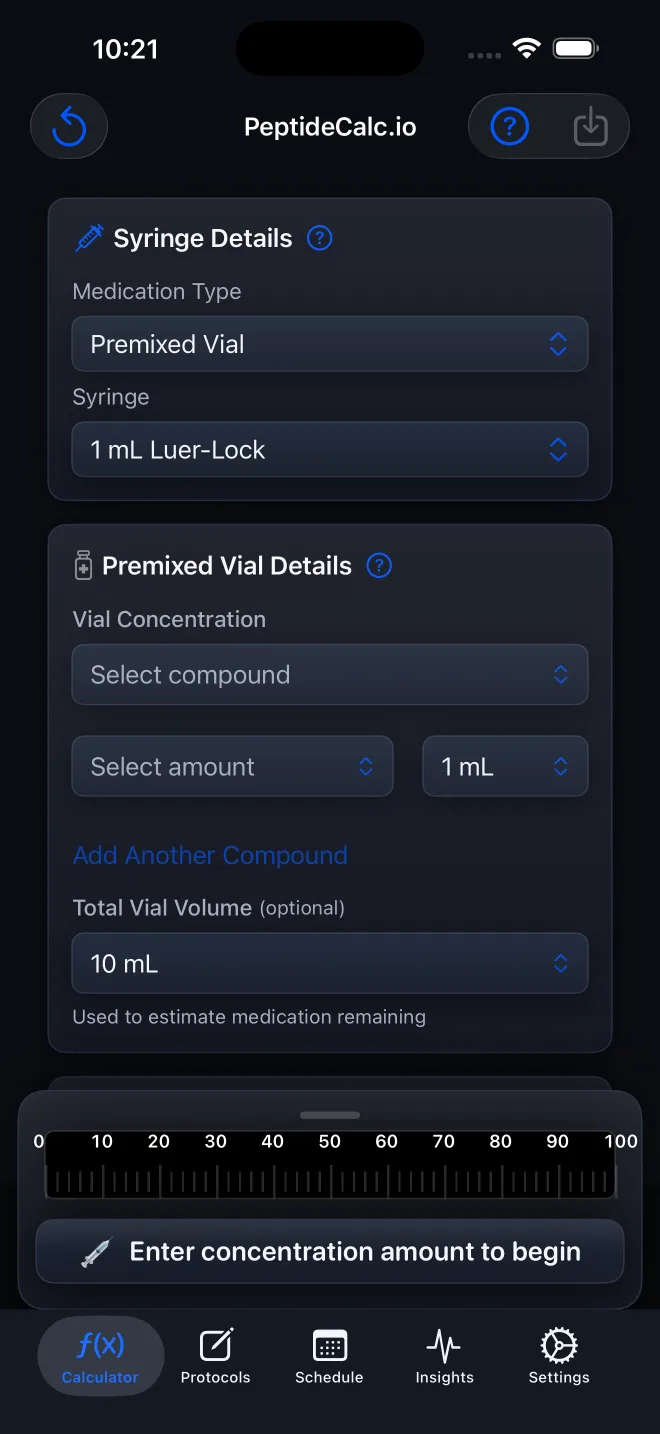
On Calculator, choose Premixed Vial under Medication Type. Select the matching syringe, then enter the labeled Vial Concentration, Total Vial Volume, and your independently determined Target Dose. PeptideCalc calculates from those values.
Premixed Vial is for a liquid vial whose concentration and total volume are already known. It replaces the Peptide Vial water-and-content inputs with fields for the labeled concentration and volume.
Copy the units as well as the numbers. PeptideCalc cannot verify that a concentration, volume, syringe, or target dose is correct for you.
Scope: This page explains PeptideCalc controls and software workflows. It does not choose a medication, dose, liquid, syringe mark, preparation method, or administration technique. Use the product label and instructions from a licensed clinician or pharmacist to decide whether any input or result is appropriate. Use Premixed Vial only when the concentration and total volume are supplied on the label or by a licensed clinician or pharmacist.
These labels and steps were checked in the public PeptideCalc 2.7.7 app on .
See the steps in PeptideCalc
Step-by-step instructions
Step 1: Open Calculator
Open PeptideCalc and select Calculator in the tab bar.
Step 2: Choose Premixed Vial
Open Medication Type and choose Premixed Vial. The Calculator will show Premixed Vial Details.
Step 3: Select the matching syringe
Under Syringe, choose the type and capacity that match the syringe you use.
Step 4: Enter Vial Concentration
Under Premixed Vial Details, enter the Vial Concentration shown on the label and select its matching unit.
Step 5: Enter Total Vial Volume
Enter the vial's labeled Total Vial Volume in mL. This is the full volume in the vial, not a target dose.
Step 6: Enter the supplied Target Dose
Enter the independently determined or prescribed Target Dose using the matching unit, then review the calculated syringe result.
Questions about this PeptideCalc workflow
When should I use Premixed Vial instead of Peptide Vial?
Use Premixed Vial when your source information gives a known concentration and total liquid volume. Peptide Vial instead asks for vial contents and a water amount.
What does Total Vial Volume mean?
It is the full labeled liquid volume in the vial, entered in mL. It is separate from the Target Dose.
Does PeptideCalc confirm that the concentration is correct?
No. PeptideCalc uses the number and unit you enter. Check both against the label or instructions from your clinician or pharmacist.
Follow the steps in PeptideCalc
Check Apple's listing for the current price, compatibility, and availability.

Related PeptideCalc resources
Browse all PeptideCalc tutorials.