Inventory records and estimates
Peptide Inventory Tracker for iPhone and iPad
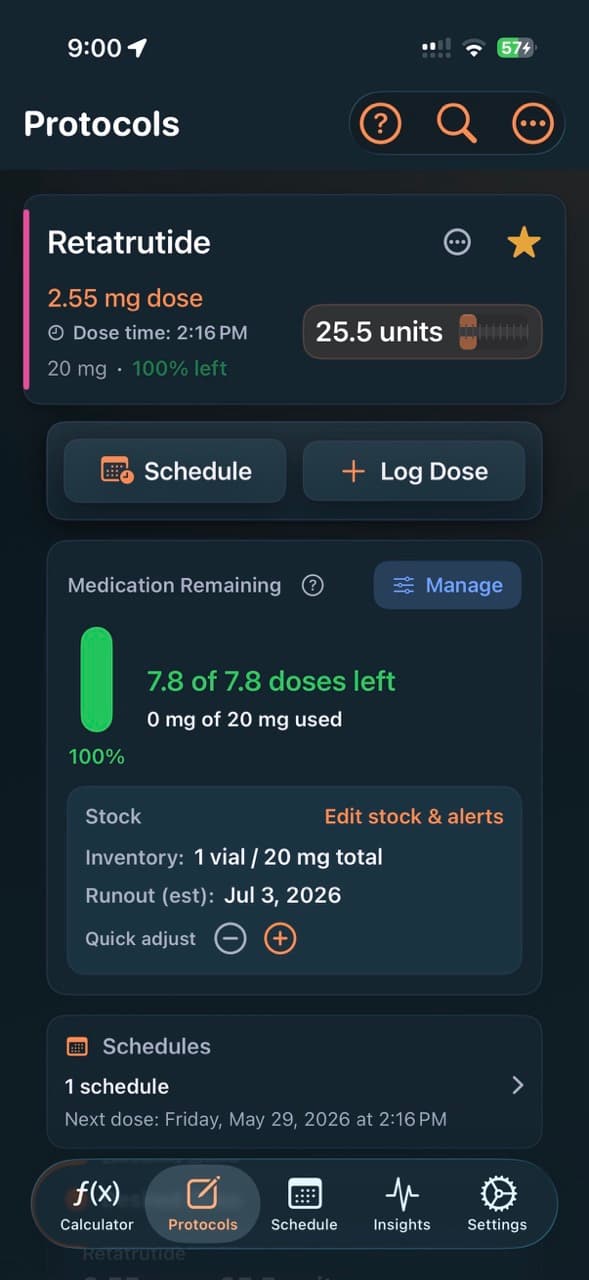
PeptideCalc tracks the medication containers and compatible syringe or pen supplies you enter, then estimates remaining stock and runout when the required protocol, schedule, and dose-log data is available.
Use schedule-based forecasting for planned events or log-based depletion for completed records. Every remaining-stock, status, and runout value depends on the accuracy and completeness of your own entries.

$4.99 once · iPhone and iPad · iOS 18.6 or later
Product facts
- Platform
- iPhone and iPad running iOS or iPadOS 18.6 or later.
- Price
- $4.99 as a one-time App Store purchase.
- Account
- No PeptideCalc account is required.
- Sync
- Optional iCloud sync is available for supported app data across signed-in Apple devices.
PeptideCalc uses app analytics and crash or diagnostic reporting as described in its Privacy Policy.
What it does
Inventory tools confirmed in the iOS app
Medication container records
Track user-entered stock for vials, prefilled pens, single-use injectors, and oral items measured by pills per bottle or container volume.
Syringe and pen supplies
Add supported peptide syringes, premixed-medication syringes, and pen needles as separate supply inventory items.
On-hand and capacity details
Enter the number of containers on hand and the applicable container size, injections per pen, pills per bottle, or other supported capacity details.
Schedule-based estimates
When required protocol and active-schedule details are present, PeptideCalc can estimate remaining containers, days, doses, and a runout date from upcoming events.
Log-based usage estimates
A log-based inventory mode can subtract completed scheduled and as-needed dose records instead of forecasting from a future schedule.
Status filters and optional alerts
Review built-in Low and Critical inventory filters and separately configure optional local alerts using a containers-or-syringes threshold or an estimated-days-remaining threshold.
How inventory tracking works in PeptideCalc
- 1
Save or link the item
Saving a medication protocol creates its medication inventory record; syringe and pen supplies can be added from Inventory.
- 2
Enter stock and forecast inputs
Add the on-hand count and capacity details, then choose schedule-based or log-based depletion and provide the data that mode needs.
- 3
Review the estimate
Use the remaining-stock, status, and runout views as estimates derived from your entries, and update the record when your actual stock changes.
Scope and limitations
What the app does not decide
- Remaining-stock and runout values are estimates based on the stock, container, protocol, schedule, and completed-log data you enter; PeptideCalc cannot measure the contents of a container.
- A schedule-based estimate may be unavailable until the item has both usable container details and a matching active schedule.
- Low and Critical labels reflect built-in forecast thresholds in the app, not a clinical assessment or a guarantee that medication or supplies will be available.
- Optional inventory notifications depend on the thresholds you configure and on iOS notification delivery and permissions.
- PeptideCalc does not recommend what to purchase, when to reorder, what to take, or how to use a medication or supply.
Frequently asked questions
What medication forms can the PeptideCalc inventory tracker record?
PeptideCalc supports inventory models for vials, prefilled pens, single-use injectors, and oral items. Oral stock can use supported pill-count or container-volume details.
Can PeptideCalc track syringe and pen supplies?
Yes. The Inventory add flow includes supported peptide syringes, premixed-medication syringe sizes, and pen needles as supply items.
How does PeptideCalc estimate a runout date?
Schedule-based mode uses the active schedule and container details you supplied. Log-based mode uses completed dose records. If required inputs are missing, the app identifies the details or schedule it still needs instead of presenting a complete forecast.
Does a Low or Critical status mean I will run out on that date?
No. Low and Critical are app statuses calculated from the entered on-hand amount and built-in container-or-days rules. Actual use, waste, missed logs, schedule changes, and other factors can change the result.
Does the inventory tracker require a PeptideCalc account?
No PeptideCalc account is required. Optional iCloud sync is available for supported app data, and app analytics and diagnostics are disclosed in the Privacy Policy.
Related PeptideCalc pages
Peptide tracker app
See how protocols, dose records, schedules, sites, and inventory fit together.
Peptide schedule tracker
Review the user-defined schedules that can supply planned inventory events.
Complete iOS app overview
Compare PeptideCalc calculation, tracking, inventory, sync, and import tools.
Keep your own records together on iPhone or iPad
PeptideCalc is available for a $4.99 one-time purchase and does not require a PeptideCalc account.