How to Pause and Resume a Schedule in PeptideCalc
Direct answer
Open Schedules > Active, swipe the schedule left, and tap Pause. It moves under Inactive with a Paused label and its reminders stop while paused. To resume it, expand Inactive, swipe the paused row left, and tap Resume. Existing history remains.
Pausing is useful when you want a schedule to stop running without deleting its existing log history. The protocol remains separate from the schedule.
While the schedule is paused, PeptideCalc cancels its scheduled reminders. Resume it only when you want that schedule active again, then review its reminder settings.
Scope: This page explains PeptideCalc controls and software workflows. It does not choose a medication, dose, liquid, syringe mark, preparation method, or administration technique. Use the product label and instructions from a licensed clinician or pharmacist to decide whether any input or result is appropriate. Pausing changes schedule activity and reminders; it does not erase existing logged history.
These labels and steps were checked in the public PeptideCalc 2.7.7 app on .
See the steps in PeptideCalc
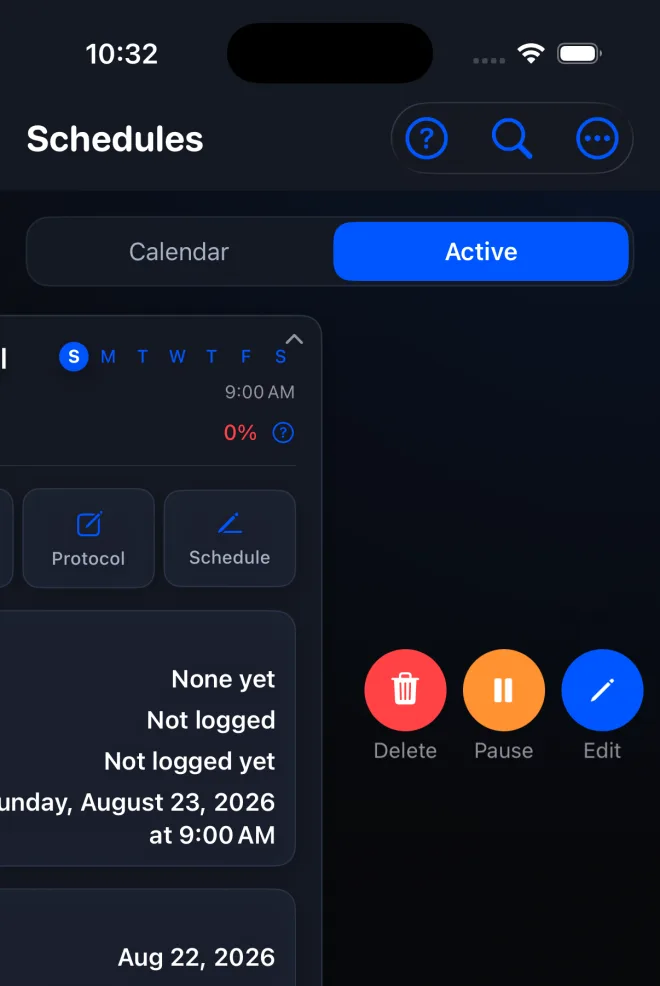
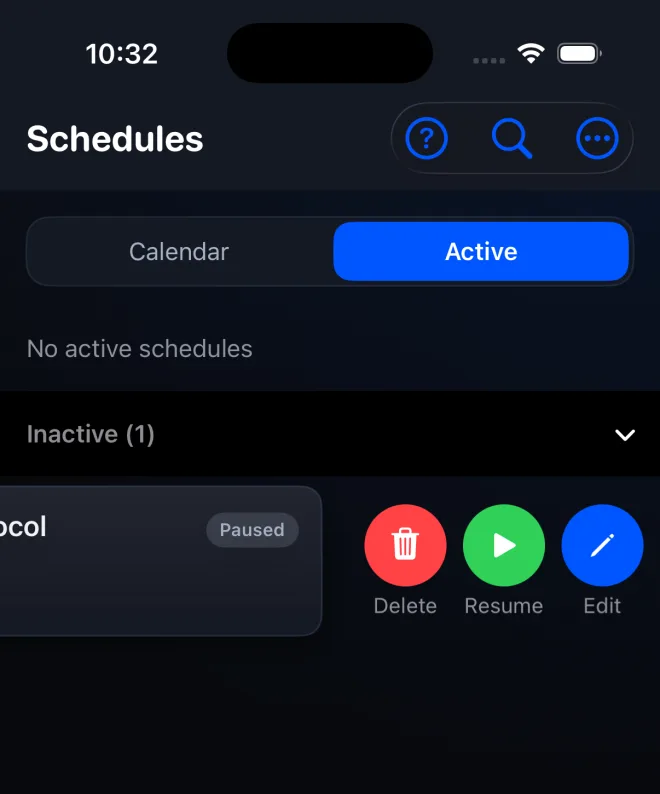
Step-by-step instructions
Step 1: Open Schedules and Active
Open Schedules and choose Active to see the schedules that are currently running.
Step 2: Find the schedule
Confirm the schedule name and details so you pause the intended schedule.
Step 3: Swipe left and tap Pause
Swipe the active schedule card left, then tap Pause. The schedule moves out of Active, and its scheduled reminders are canceled while it is paused.
Step 4: Expand Inactive when you are ready
On Schedules, tap Inactive to reveal schedules that are not currently running. The paused row shows a Paused label.
Step 5: Swipe left and tap Resume
Swipe the paused schedule row left and tap Resume. It returns to Active.
Step 6: Review the resumed schedule
Open the resumed schedule and review its future dates and reminder settings. Its existing logged history remains available.
Questions about this PeptideCalc workflow
Do reminders continue while a schedule is paused?
No. PeptideCalc cancels that schedule's scheduled reminders when you pause it. Review reminder settings after resuming.
Does pausing delete the schedule's history?
No. Existing logged history remains when the schedule is paused and after it is resumed.
Where did the paused schedule go?
It moves from Active to the collapsible Inactive section and displays a Paused label.
Is pausing a schedule the same as archiving its protocol?
No. A schedule and its saved protocol have separate active states. Pause or resume the schedule on Schedules; archive or restore the protocol on Protocols.
Follow the steps in PeptideCalc
Check Apple's listing for the current price, compatibility, and availability.

Related PeptideCalc resources
Browse all PeptideCalc tutorials.