How to Set the Default Schedule View in PeptideCalc
Direct answer
Open Schedules, tap Schedule options, choose Default View, then select Overview or Today. The choice changes the Calendar display only; it does not edit protocols, schedules, or logs.
Overview shows Overdue, Today, upcoming days, and Recent doses. Today focuses on one selected day and its scheduled and logged doses.
The setting is available directly in the Schedules options menu and is saved when you select it.
Scope: This page explains PeptideCalc controls and software workflows. It does not choose a medication, dose, liquid, syringe mark, preparation method, or administration technique. Use the product label and instructions from a licensed clinician or pharmacist to decide whether any input or result is appropriate.
These labels and steps were checked in the public PeptideCalc 2.7.7 app on .
See the steps in PeptideCalc
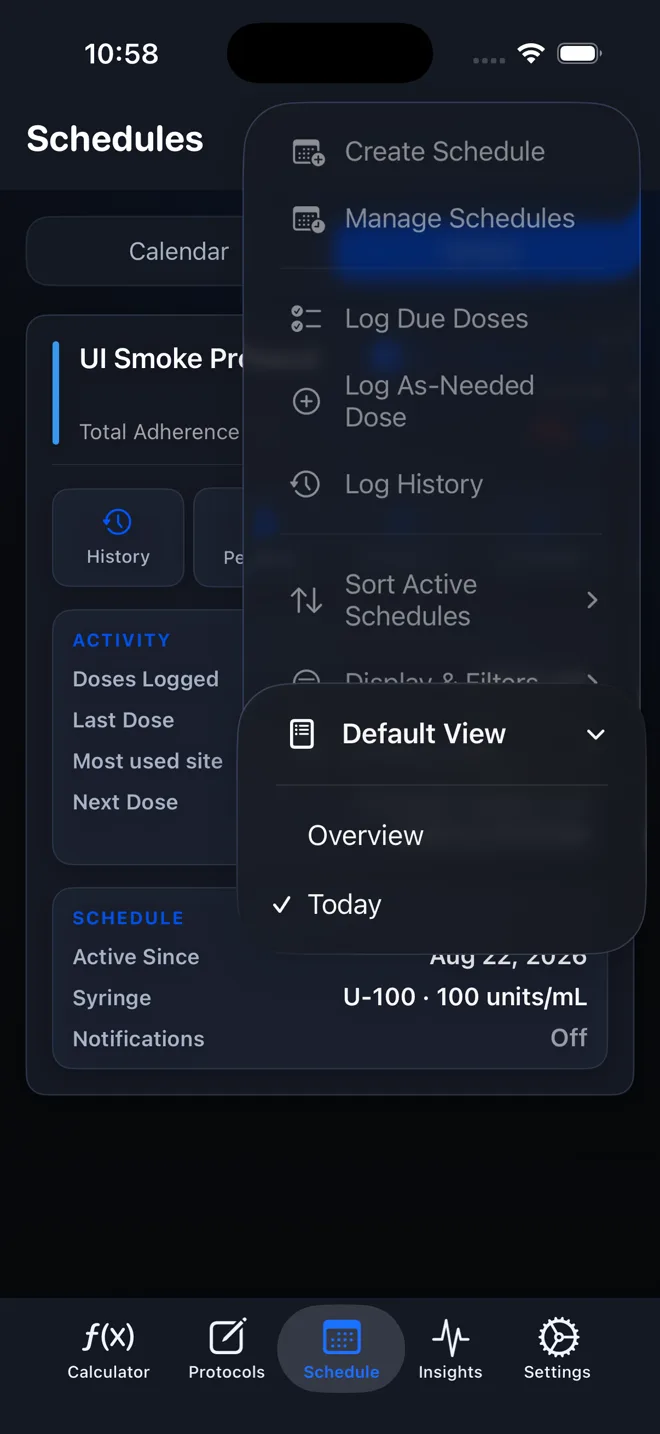
Step-by-step instructions
Step 1: Open Schedules
Tap Schedules in PeptideCalc.
Step 2: Open Schedule options
Tap the three-dot button labeled Schedule options in the top-right corner.
Step 3: Choose Default View
In the menu, tap Default View to see the available Calendar display choices.
Step 4: Select Overview or Today
Choose Overview for the multi-section summary or Today to focus the Calendar on the current day.
Step 5: Check Calendar
Open Calendar and confirm it uses the selected default. You can return to Default View at any time to change it.
Questions about this PeptideCalc workflow
What is the difference between Overview and Today?
Overview shows Overdue, Today, upcoming days, and Recent doses. Today focuses on one selected day and that day's scheduled and logged doses.
Does Default View change my schedule?
No. It changes how Calendar opens; it does not edit protocol details, schedule dates, reminders, or logs.
How do I make PeptideCalc open Schedule to Today?
Open Schedules, tap Schedule options, choose Default View, and select Today. This changes the Calendar display only.
Why does PeptideCalc Schedule open to Overview?
Overview is selected as the current Default View. Choose Schedules > Schedule options > Default View > Today if you want Calendar to focus on the current day instead.
Follow the steps in PeptideCalc
Check Apple's listing for the current price, compatibility, and availability.

Related PeptideCalc resources
Browse all PeptideCalc tutorials.