How to Create an Intranasal Spray Protocol in PeptideCalc
Direct answer
PeptideCalc does not have a separate intranasal-spray protocol type. On Calculator, choose Medication / Supplement, enter a custom name, select Liquid, and enter the dose and concentration from the product label or your clinician or pharmacist. Save the protocol and optional schedule. When you log a dose, set Administration Type to Nasal and optionally choose Nasal Side.
An intranasal spray fits the liquid Medication / Supplement workflow in PeptideCalc. The protocol stores the labeled dose and concentration, while the Log Dose sheet records that the dose was administered nasally.
PeptideCalc accepts mg or mcg for a new liquid Medication / Supplement entry; it does not have a sprays unit. If your directions list only a number of sprays, do not invent a conversion. Use the official amount delivered per spray or concentration information from the product label, prescriber, or pharmacist.
Scope: This page explains PeptideCalc controls and software workflows. It does not choose a medication, dose, liquid, syringe mark, preparation method, or administration technique. Use the product label and instructions from a licensed clinician or pharmacist to decide whether any input or result is appropriate. This guide explains app setup and recordkeeping only. It does not select an intranasal product, convert sprays to a dose, or provide administration technique.
These labels and steps were checked in the public PeptideCalc 2.7.7 app on .
See the steps in PeptideCalc
Step-by-step instructions
Step 1: Choose Medication / Supplement
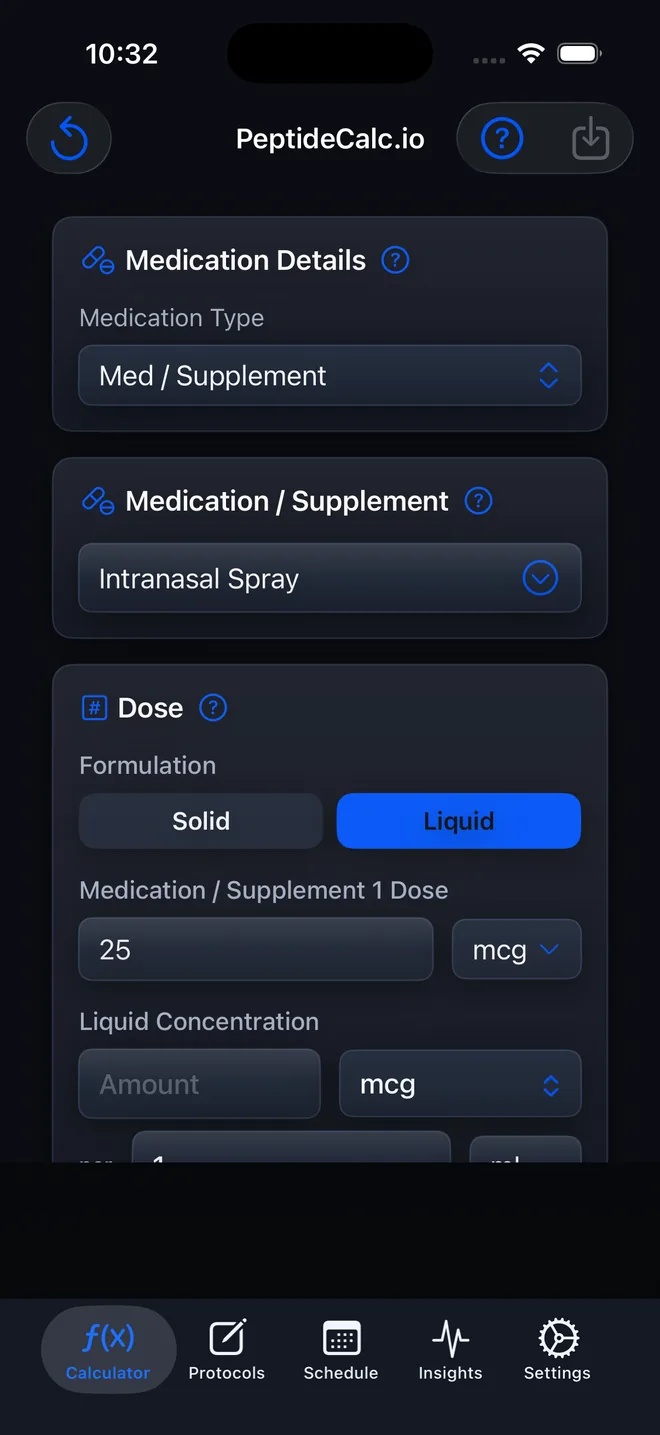
Open Calculator, tap Medication Type, and choose Medication / Supplement. This is the non-injectable workflow used for liquid entries such as a prescribed intranasal spray.
Step 2: Enter a recognizable name
Use the Medication / Supplement menu, switch to Custom if needed, and enter the name you want to see on the saved protocol and schedule.
Step 3: Choose Liquid
Under Dose, set Formulation to Liquid. The calculator shows the dose and Liquid Concentration fields.
Step 4: Enter the labeled dose and concentration
Enter the supplied dose in mg or mcg, then enter Liquid Concentration as mg or mcg per mL exactly as provided on the product label or by your clinician or pharmacist. PeptideCalc displays the corresponding mL per dose. It does not convert a spray count without labeled amount-per-spray or concentration information.
Step 5: Save the protocol and optional schedule
Tap Save Protocol, enter a Protocol Name, and turn on Create Schedule if you want reminders or scheduled dose cards. Review the frequency, time, and other schedule fields before tapping Save.
Step 6: Open Log Dose
For a scheduled dose, open its card from Schedule and tap Log Dose. For an unscheduled dose, open Protocols, expand the saved protocol, and tap Log Dose.
Step 7: Set Administration Type to Nasal
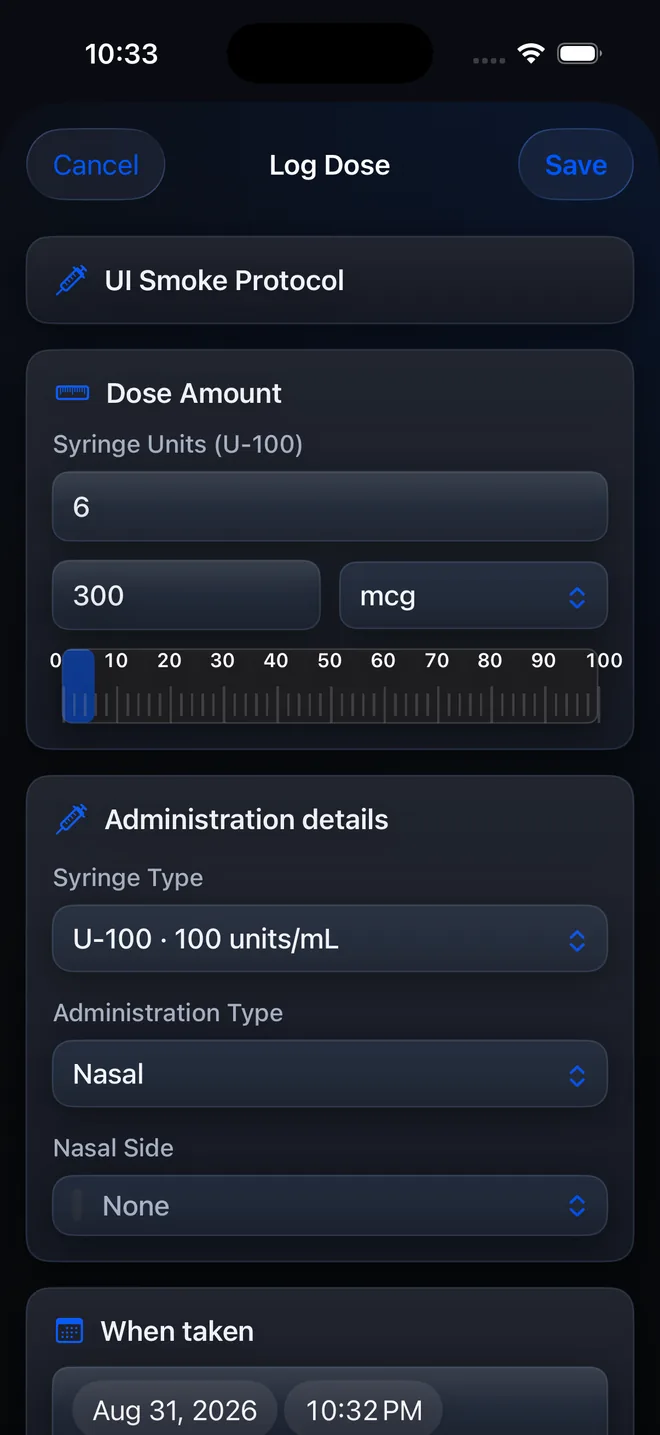
Under Administration details, open Administration Type and choose Nasal. PeptideCalc changes the location field to Nasal Side; choose Left Nostril, Right Nostril, Both Nostrils, a relevant custom option, or None to match what actually occurred.
Step 8: Save the dose log
Review the dose, date, time, Administration Type, and optional Nasal Side, then save the log. PeptideCalc remembers the last administration type saved for that protocol and uses it as the starting choice on a later log.
Questions about this PeptideCalc workflow
Does PeptideCalc have an intranasal spray protocol type?
No. Create the protocol with Medication Type set to Medication / Supplement and Formulation set to Liquid. Administration Type is recorded separately when you log a dose.
Can I enter sprays as the dose unit?
No. A new liquid Medication / Supplement entry uses mg or mcg and a labeled concentration in mL. If your directions only state a number of sprays, use official amount-per-spray or concentration information from the product label, prescriber, or pharmacist rather than guessing.
Where do I choose Nasal in PeptideCalc?
Choose Nasal in the Log Dose sheet under Administration details > Administration Type. It is not a Medication Type on the Calculator screen.
Can I track which nostril was used?
Yes. After you choose Nasal, the sheet shows Nasal Side with Left Nostril, Right Nostril, Both Nostrils, relevant custom options, and None. Record only what actually occurred.
How do I create reminders for an intranasal spray?
When saving the protocol, turn on Create Schedule and enter the prescribed frequency and times. You can also add or edit a schedule later from Protocols.
Will PeptideCalc remember that the protocol is nasal?
After you save a dose log with Administration Type set to Nasal, PeptideCalc remembers that last-used administration type for the protocol and preselects it the next time you open Log Dose.
Follow the steps in PeptideCalc
Check Apple's listing for the current price, compatibility, and availability.

Related PeptideCalc resources
Browse all PeptideCalc tutorials.