How to Add a Custom Administration Site in PeptideCalc
Direct answer
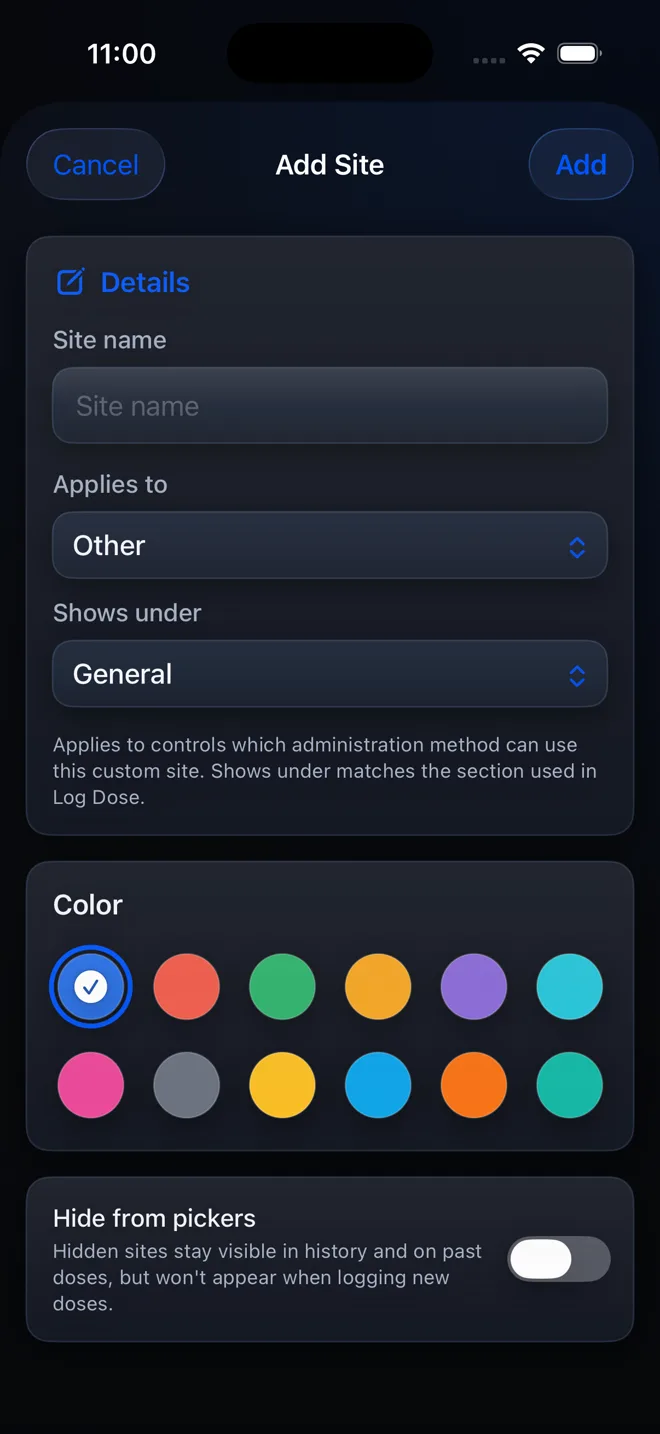
Go to Settings > Treatment & Reminders > Administration Sites, tap Add administration site, enter the Site name, choose Applies to and Shows under, optionally choose a color, then tap Add.
Custom administration sites let you name and organize a location that is not already in your list. The Applies to and Shows under choices control where the site appears in PeptideCalc.
Choose a location or administration route only from your product instructions and licensed clinician or pharmacist.
Scope: This page explains PeptideCalc controls and software workflows. It does not choose a medication, dose, liquid, syringe mark, preparation method, or administration technique. Use the product label and instructions from a licensed clinician or pharmacist to decide whether any input or result is appropriate.
These labels and steps were checked in the public PeptideCalc 2.7.7 app on .
See the steps in PeptideCalc
Step-by-step instructions
Step 1: Open Administration Sites
Open Settings, tap Treatment & Reminders, then tap Administration Sites.
Step 2: Tap Add administration site
Tap the plus button labeled Add administration site. The Add Site sheet opens.
Step 3: Enter the Site name
Enter a short, recognizable name in Site name.
Step 4: Set Applies to and Shows under
Choose the appropriate Applies to value, then use Shows under to select the group where the custom site should appear.
Step 5: Choose a color if wanted
Use the color control if you want the site to be easier to recognize in the app.
Step 6: Tap Add
Review the fields and tap Add. The custom site is now available in the relevant administration-site pickers.
Questions about this PeptideCalc workflow
What does Shows under change?
It controls the group where the custom site appears when you choose an administration site in PeptideCalc.
Does adding a custom site choose an administration route for me?
No. It only adds an app option. Follow the product label and your licensed clinician or pharmacist for the appropriate location or route.
Where will I use the custom site?
It appears in the administration-site pickers that match the Applies to and Shows under choices you saved.
Follow the steps in PeptideCalc
Check Apple's listing for the current price, compatibility, and availability.

Related PeptideCalc resources
Browse all PeptideCalc tutorials.